


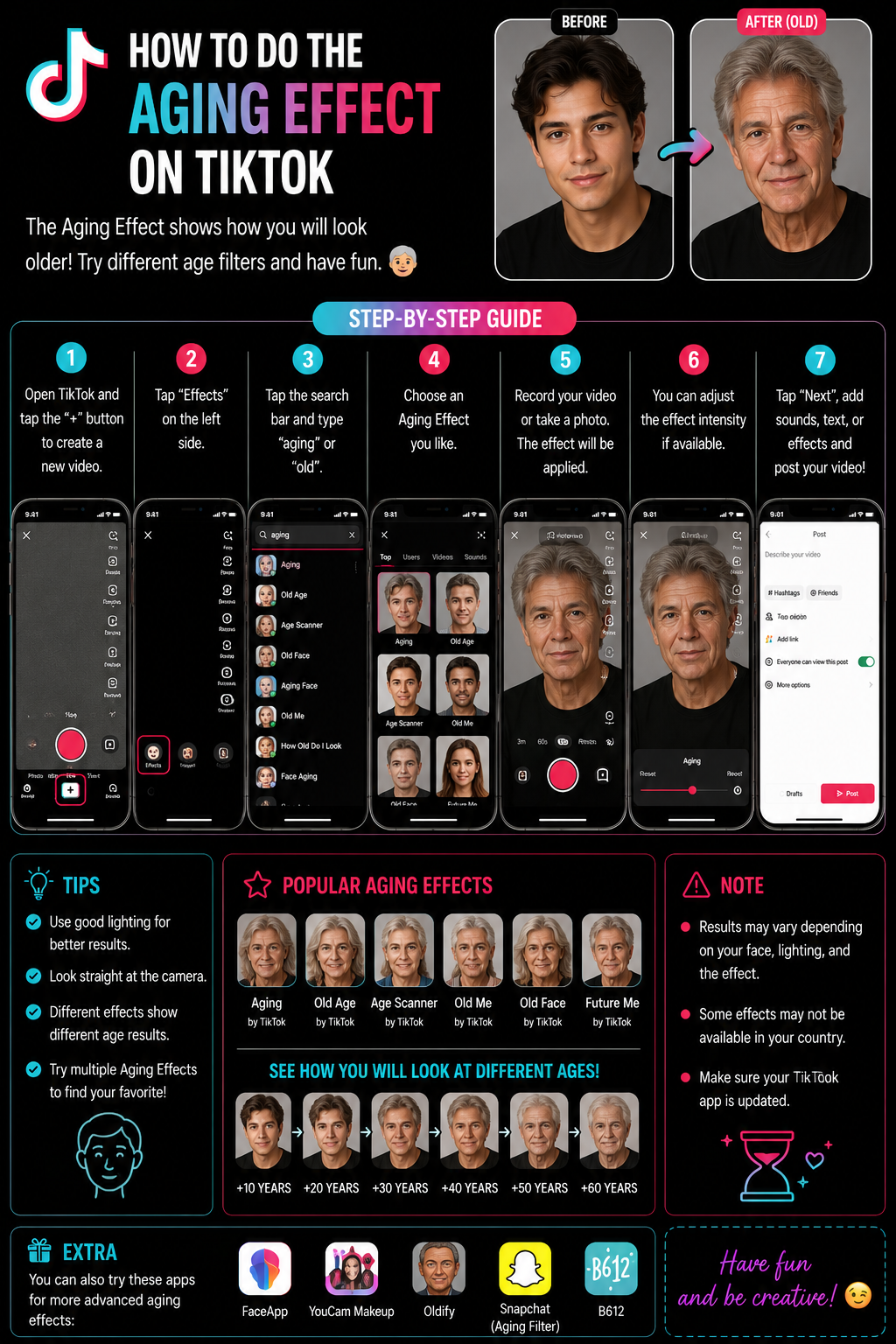
How to Do the Aging Effect on TikTok (Old Age Filter) 👴👵✨
The TikTok aging effect is the one that makes you look older in real time, usually adding wrinkles, changing skin texture, sometimes altering hairline, and giving you that “future me” vibe in seconds 😅. The important thing to know is that TikTok doesn’t always keep one single official aging filter pinned forever. Effects rotate, names change, and some effects are creator-made, so the most reliable method is not memorizing one name, it’s learning the effect search workflow and saving the effect once you find the version you like.
TikTok’s own guidance explains the basic effects flow: open the create screen, tap Effects, choose an effect, then record. TikTok Newsroom: how to use effects ✅
Definitions 🧠
Aging effect is an AR face effect that uses facial landmark tracking to apply an “older” texture and shape model on your face, and it reacts to your movement in real time.
Effect Gallery is TikTok’s Effects library where you can browse or search for effects by keyword, and it changes constantly based on trending content and creator submissions.
Save effect means bookmarking it so you can use it later without searching again, which is the best way to prevent “I can’t find it anymore” frustration 😄.
Why Important? 🎯😄
The aging effect works because it creates instant contrast, which is perfect for TikTok hooks: “this is me now vs me at 70,” “my reaction when I see my future self,” “if I keep drinking coffee like this,” or “me after one more client revision” 😅. It’s fast, it’s visual, and it needs almost no editing.
Metaphor time: it’s like holding up a time-travel mirror 🪞⏳. You don’t need a storyline, the transformation itself is the story.
How to Apply ✅🛠️
Method 1: Find the Aging Effect via TikTok Effects Search 🔎✨
1) Open TikTok and tap + to create.
2) Tap Effects.
3) Use the Effects search bar and try keywords like:
- aging
- old
- old age
- age
- wrinkles
- elder
- future me
4) Tap an effect, preview it on your face.
5) Tap Save so it stays in your effects tray.
6) Record your video and post.
This matches TikTok’s official “choose an effect from Effects, then record” workflow. TikTok: using effects ✅
Method 2: Use the Exact Aging Effect from a Trending Video 🔥🎬
If you want the exact same aging look you saw on someone’s TikTok, this is the fastest method:
1) Find a video using the aging effect you like.
2) Tap the effect name on the video.
3) Tap Use this effect.
4) Save it, then record.
This avoids the common problem where you search “aging” and see ten different filters that all look slightly different 😅.
Method 3: Aging Effect on a Photo Instead of Live Video 🖼️
Some aging effects allow you to apply it to a still photo. If your chosen effect supports photo mode, you can upload a selfie and apply the effect. If it does not, you can still record a short video while holding still for a “photo-like” result.
Make It Look Better ✨
1) Bright lighting 💡 makes wrinkles and skin texture look more realistic and reduces tracking glitches.
2) Face the camera 🙂. Side angles reduce landmark accuracy.
3) Remove heavy beauty filters if the aging effect looks too soft or unstable, because stacking smoothing can fight the effect.
4) Keep background simple to help the effect focus on your face.
5) Record short segments so the effect doesn’t drift as your phone heats up.
If You Can’t Find It 🧯😵💫
1) Update TikTok because effect availability can shift with versions.
2) Try different keywords like old, wrinkles, age, elder, future me.
3) Switch networks once (Wi-Fi to mobile data) if effects thumbnails won’t load.
4) Clear cache inside TikTok settings if Effects search results appear empty.
5) Use the effect from a video because region differences can hide effects from search.
Table 📊
| What you want | Best method | Keywords | Pro tip |
|---|---|---|---|
| Any aging filter quickly | Effects search | aging, old age | Save it once you find a good one |
| Exact filter from a trend | Use effect from video | none | Tap effect name and save it |
| More realistic wrinkles | Try multiple variants | wrinkles, elder | Use bright lighting |
| Apply to a photo | Photo-supporting effect | age photo | Use a front-facing selfie |
| Effect not available | Update + find via video | old, future me | Region differences are real |
Diagram 🧩
Tap + to create
     |
     v
Tap Effects
     |
     v
Search "aging" / "old age" -> preview -> save
     |
     v
Record -> edit -> post ✅
Example 😄
You want a quick hook. You search “aging,” pick a filter that gives you clear wrinkles and slightly older face shape, save it, then record a 7-second clip where you look at the camera, pause, then react with a smile and text overlay like “me after one more deadline,” and post. That’s it. No editing software needed.
Anecdote ☕😂
I’ve seen people get stuck because they searched “aging filter” once, found a perfect effect, didn’t save it, and then the next day it was buried under other trending effects. The simple fix was saving the effect immediately after previewing it. It turns a one-time discovery into a permanent one-tap tool, which saves you from repeating the scavenger hunt every time 😅💛.
Personal Experience 🙂
When I want the exact aging look everyone is using, I don’t search at all. I find one trending video with the effect I like, tap the effect name, and use it from there. That guarantees I get the same version and avoids the “mine looks different” problem.
Conclusion ✅😄
To do the aging effect on TikTok, tap +, open Effects, search “aging” or “old age,” preview and save the effect you like, then record your video. If you want the exact trending version, open a video using it and tap Use this effect, then save it. Bright lighting and a front-facing angle make the transformation look cleaner and more realistic, and once you save the effect, it becomes a quick one-tap tool you can reuse anytime without hunting again. TikTok’s own guidance confirms the core workflow: choose an effect from Effects before you record. TikTok: how to use effects ✅
10 Niche FAQs 🤓✅
1) Why do I see many “aging” effects that look different?
Different creators publish variants and TikTok rotates them in search results. Save the one you like.
2) Why does the effect look blurry?
Low light and beauty smoothing can reduce texture clarity. Increase lighting and reduce smoothing.
3) Can I use the aging effect on a saved photo?
Some versions support photo uploads. If not, record a short still clip.
4) Why does the effect drift over time?
Face tracking can drift with movement or heat. Record shorter clips and keep the phone stable.
5) Does wearing glasses affect the effect?
It can. Some effects struggle with reflections and frames. Try without glasses once.
6) Why can’t I find the same effect my friend used?
Regional differences and effect rotation. Use the effect directly from their video.
7) Can I stack aging with green screen?
Some combinations are limited. Try aging first, then use editing tools, or use another app if needed.
8) Why does the effect not detect my face?
Angle, low light, or partial face. Face camera and increase lighting.
9) Does TikTok remove effects?
Yes, creators can delete effects or they can be removed. Save early and keep alternatives.
10) Where is the official instruction for effects workflow?
TikTok Newsroom explains the basic flow: create, Effects, choose, record. TikTok effects guide
People Also Asked 🔎🙂
1) Is TikTok aging effect the same as age progression apps?
Not exactly. TikTok is real-time AR; dedicated apps may do deeper image processing.
2) Why does it look more realistic on some faces?
Face shape, lighting, and camera quality influence segmentation and texture rendering.
3) Can I make it look older than the filter shows?
Try different effect variants. Some exaggerate age more than others.
4) Does the effect work on Android and iPhone?
Yes, but performance varies with device power and app version.
5) What’s the fastest way to get the exact trend filter?
Open a video that uses it, tap the effect name, then “Use this effect,” and save it.

